- Home Page /
- Electronics /
- Camera /
- Lighting & Studio /
- Studio Lights & Accessories /
- On-Camera Video Lights /
- HumanCentric Video Conference Lighting, Add-O...
0 ratings




Item #:
52653462
HumanCentric Video Conference Lighting, Add-On Only Light for Streaming and Video Conferencing, Add-On Only Kit Requires Existing Single or Double
Item #:
52653462
XCD 216
Price Details
Excluding Shipping & Custom charges ( Shipping and custom charges will be calculated on checkout )
*All items will import from US
In stock
 Imported from USA store
QTY:
Order now and get it around Thursday, June 25
Secured transaction
Ubuy works hard to protect your security and privacy. Our advanced payment security system ensures confidentiality by encrypting your information during transmission using AES (Advanced Encryption Standards) and SSL (Secure Socket Layer) protocols. Your payment details are 100% secure as we do not share your payment details with third party sellers.
Our Top Logistics Partners


Present your best with a HumanCentric video conference light, single light kit.

Fast
Shipping

Free
Return*

Secure Packaging

100% Original Products

PCI DSS Compliance

ISO 27001 Certified


Note: Step Down Voltage Transformer required for using electronics products of US store (110-120). Recommended power converters Buy Now.


What Stands Out
Adjustable Brightness
Customize lighting intensity with adjustable brightness settings, ensuring perfect illumination for any environment during video conferences or streaming, enhancing visibility and professionalism.
Easy Setup
Quickly attaches to monitors and laptops with a hassle-free design, making it accessible for anyone looking to upgrade their video quality without complicated installations.
Compact Design
Sleek and portable, this lighting solution offers powerful performance without bulky equipment, making it ideal for home offices and travel, providing professional lighting wherever needed.
Product Details
- Very important: This is an expansion Add-On Only kit for Single or Double HumanCentric light kits. Add-On Only kit requires another Single or Double HumanCentric light kit to function. Add-On Only light does not include a power cable or controller. It will not function on its own. Please review this product page carefully before purchasing.
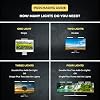
- Expandable up to four lights: Daisy chain up to four total lights for more immersive lighting for video recording. Important note: Due to power delivery limitations of USB-A, we do not recommend powering more than two lights with a USB-C to USB-A adapter.
- Make sure you don't have a light or a window behind you, as your face won't look bright enough. This is because the camera is compensating for the bright light behind you by making the whole image dark. Webcam lighting for video conferencing provides a more professional appearance and streaming presence: Get the ideal video call light to match your skin tone and environment. Add a Zoom light to improve engagement over video meetings.
- Easy set up and removal: The monitor or laptop light sits on top of your screen with a webcam style stand. It is meant for stationary use and does not use unreliable suction cups or damaging adhesive just for a computer video light. Position your camera first then add the monitor lights.
- Preinstalled diffuser provides a soft light panel for a more natural glow and appearance. Look your best on a video call with a proper video conference lighting kit. Adjustable brightness and temperature. Includes cable clips and Velcro straps.
- Important notes: The light does not contain a battery. Power adapter not included. Must be plugged into a USB-C or USB-A port to function. USB-C to USB-A adapter included. You may need a USB wall adapter (not included) for full brightness if your USB-A port’s power delivery is low. Add-On light does not include power cable and only functions WITH a Single or Double light kit. The maximum space between connected lights is 30 inches.
| Brand | HumanCentric |
| UPC | 810009091660 |
| Unit Count | 2.0 Count |
| Manufacturer Part Number | 301-1038-PEX |
| Model Number | 301-1038-PEX |
| Built-In Media | USB-C to USB-A adapter included |
| Manufacturer | HumanCentric |
| Connectivity Technology | USB |
| Hardware Interface | USB |
| Flash Modes Description | Constant illumination, adjustable brightness, adjustable color temperature |
| Water Resistance Level | Not Water Resistant |
| Has Self-Timer | No |
| Compatible Devices | Computer with USB ports, webcams, video conferencing software |
| Audio Recording | No |
| Number of Items | 1 |
| Package Weight | 1.27 Pound |
What's in the box
USB-C to USB-A adapter included
Who Should Buy?

-
Remote Workers
Ideal for remote employees needing professional lighting for clearer video quality during virtual meetings and presentations.
-
Content Creators
Great for streamers and YouTubers looking for an enhanced lighting solution without the bulk of ring lights.
-
Online Educators
Perfect for teachers conducting online classes, ensuring students see them clearly and reducing eye strain.

-
Outdoor Use
Not suitable for outdoor lighting needs as it is optimized for indoor video conferencing environments.
-
Photography Needs
May not meet professional photography requirements as it lacks the versatility of advanced lighting setups.
-
Budget Users
Not ideal for those seeking low-cost lighting options, as it may be more expensive than basic alternatives.
Product Description
Have any Query? Chat with us
Customer Questions & Answers
-
Question:
What is the HumanCentric Video Conference Lighting designed for?
Answer: The HumanCentric Video Conference Lighting is specifically designed to enhance lighting during streaming and video conferencing sessions. This add-on light helps to eliminate harsh shadows and create a professional look, making it ideal for online meetings, webinars, and live streams. Whether you're a content creator, remote worker, or educator, optimal lighting can significantly improve video quality and audience engagement. For instance, using this lighting kit during a virtual presentation can help ensure that you appear clear and professional to your viewers. -
Question:
How does the add-on feature of this lighting kit work?
Answer: The add-on feature of the HumanCentric lighting kit requires an existing single or double light setup. This means that it complements your current lighting without the need for a completely new configuration. By adding this supplemental light, you can achieve a more balanced illuminance in your space. This is particularly useful for users already invested in video production equipment, allowing them to enhance their lighting setup seamlessly and elevate their video quality without significant adjustments. -
Question:
Do I need any specific equipment to use the HumanCentric lighting?
Answer: Yes, to utilize the HumanCentric Video Conference Lighting effectively, you'll need to have an existing single or double light setup. This product is designed as an add-on, meaning it enhances your current lighting configuration. If you already have lights installed for video shooting or streaming, this add-on can help you achieve more professional results by providing additional light where needed, making it a perfect addition for videographers and streamers looking to upgrade their set-up. -
Question:
Can this video conference light be used for purposes other than streaming?
Answer: Absolutely! While the HumanCentric Video Conference Lighting is tailored for streaming and video conferencing, it can also be beneficial for photography, online classes, and even makeup applications. The adjustable nature of the lighting allows for versatility in different scenarios, ensuring optimal visibility. For example, content creators can use this light while shooting tutorials, enhancing the quality of their videos and providing a better experience for their audience. -
Question:
Is the installation process user-friendly?
Answer: Yes, the installation process for the HumanCentric Video Conference Lighting is designed to be user-friendly. It easily integrates with your existing light setup, allowing you to add it without complicated setups or technical expertise. Simply mount the add-on light to your current system as per the provided instructions to achieve improved lighting. This straightforward process is beneficial for users who want to enhance their video quality quickly and effectively without deep technical knowledge. -
Question:
What are the benefits of good lighting in video conferencing?
Answer: Good lighting in video conferencing ensures clarity, professionalism, and better engagement with your audience. Well-lit videos allow viewers to see you clearly, making your facial expressions and body language more discernable. This is crucial in professional settings like interviews or online presentations where first impressions matter. Additionally, proper lighting enhances the overall aesthetic of your presentation, making your content more visually appealing and increasing viewer retention during streams or meetings. -
Question:
Can I adjust the brightness of the HumanCentric Video Conference Lighting?
Answer: Yes, the HumanCentric Video Conference Lighting allows for brightness adjustments, giving you control over the intensity based on your specific needs and environment. This feature is crucial for adapting to different settings—such as a dimly lit room or during the day with natural light. Customizing the brightness can help you achieve your desired look and ensure that you’re always camera-ready, whether you’re hosting a lively webinar or a formal business meeting. -
Question:
Is this lighting kit suitable for team collaborations or group presentations?
Answer: Yes, the HumanCentric Video Conference Lighting is highly suitable for team collaborations or group presentations. Its design allows for adjustable and well-distributed lighting, which is essential when multiple participants are present in front of the camera. Whether you’re conducting a meeting with team members or hosting a collaborative workshop, good lighting ensures all participants are equally well-lit and visible, enhancing communication and overall dynamics within the session. -
Question:
How does this lighting help with video quality on different platforms?
Answer: The HumanCentric Video Conference Lighting plays a critical role in enhancing video quality across various platforms, including Zoom, Microsoft Teams, and YouTube. Proper lighting helps to reduce pixelation and improve color representation, making your footage look more professional and engaging. Whether you’re streaming a live event or recording content for social media, this lighting ensures that viewers receive the best possible experience, ultimately increasing your reach and engagement. -
Question:
Where can I buy HumanCentric Video Conference Lighting in Saint Kitts and Nevis?
Answer: You can purchase the HumanCentric Video Conference Lighting through Ubuy in Saint Kitts and Nevis. Ubuy offers a wide selection of video and streaming equipment, including this add-on lighting solution. Shopping at Ubuy not only provides you with the product you need but often comes with exclusive deals and quick access to customer support, ensuring you have a positive shopping experience while equipping yourself with the best tools for your video conferencing needs.
HumanCentric On-Camera Video Lights 301-1038-PEX Editorial Review


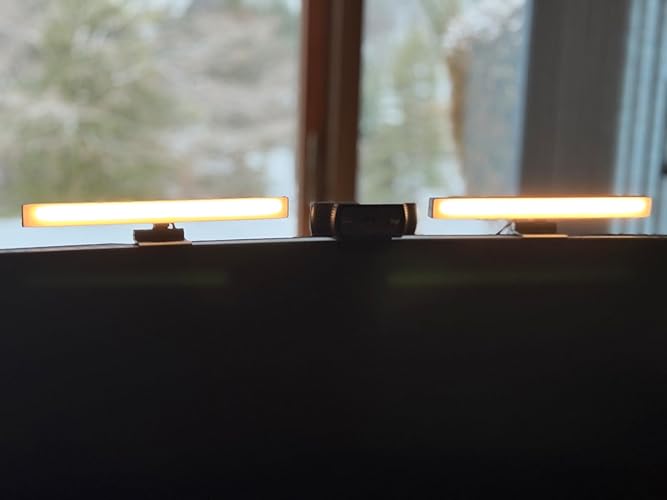


The HumanCentric Video Conference Lighting Kit includes two LED lights that can be mounted on a camera or monitor to improve video conferencing lighting. The lights come with a USB-C/USB A controller to power the lights, and the add-on light comes with a double cable to connect it to the single light that you already have. The max distance between the lights is about 16-18 inches, and the lights are controlled equally by the same controller. The product has received mixed reviews, with some customers finding the lighting to be better than other ring lights they have used and the setup to be easy. However, some customers experienced issues with the brightness of the lights, with some finding the lights to be useless for their needs. Some customers also found the cords to be too short to mount the lights where they wanted.
Customer Reviews & Ratings
1144 customers ratings
-
5 Star
60%
-
4 Star
16%
-
3 Star
11%
-
2 Star
6%
-
1 Star
7%
Review this product
Share your thoughts with other customers
Pros
- Easy setup
- Low-profile design
- Comes with USB-C/USB A controller to power the lights
- Add-on light comes with a double cable
Cons
- InConsistent brightness for some customers
Product Price History
Important information
- Limitations : For products shipped internationally, please note that any manufacturer warranty may not be valid; manufacturer service options may not be available; product manuals, instructions, and safety warnings may not be in destination country languages; the products (and accompanying materials) may not be designed in accordance with destination country standards, specifications, and labeling requirements; and the products may not conform to destination country voltage and other electrical standards (requiring use of an adapter or converter if appropriate). The recipient is responsible for assuring that the product can be lawfully imported to the destination country. When ordering from Ubuy or its affiliates, the recipient is the importer of record and must comply with all laws and regulations of the destination country.
- Not all the products listed on Ubuy are for sale, as Ubuy is a global search engine. Products are subject to export/trade regulations.
XCD 216
Order now and get it around Thursday, June 25
This item is not restrict in my country.(Please click on above link if this item is not restrict in your country, So our team will review and allow.)
QTY:
Secured transaction
Ubuy works hard to protect your security and privacy. Our advanced payment security system ensures confidentiality by encrypting your information during transmission using AES (Advanced Encryption Standards) and SSL (Secure Socket Layer) protocols. Your payment details are 100% secure as we do not share your payment details with third party sellers.
Our Top Logistics Partners
Fastest cross-border delivery
Features & Benefits
- Improve computer light for video conferencing
- Easy set up and removal
- Preinstalled diffuser provides a soft light panel for natural appearance
- Adjustable brightness and temperature
- Expandable up to four lights
- USB-C to USB-A adapter included