0 ratings

Item #:
86949288
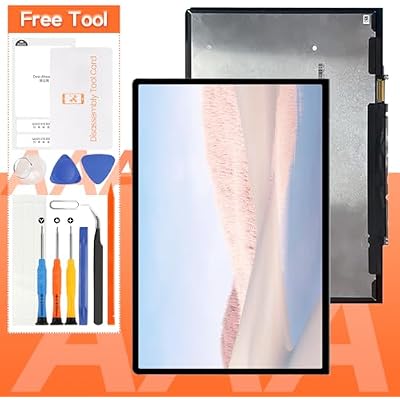
Screen Replacement for Microsoft Surface Laptop Go 1943 LCD Display Touch Screen Digitizer Full Assembly,with Tools
Item #:
86949288
XCD 437
Price Details
Excluding Shipping & Custom charges ( Shipping and custom charges will be calculated on checkout )
*All items will import from US
0 ratings
Write a review
In stock
 Imported from USA store
QTY:
Order now and get it around Sunday, June 28
Secured transaction
Ubuy works hard to protect your security and privacy. Our advanced payment security system ensures confidentiality by encrypting your information during transmission using AES (Advanced Encryption Standards) and SSL (Secure Socket Layer) protocols. Your payment details are 100% secure as we do not share your payment details with third party sellers.
Our Top Logistics Partners


All products are strictly tested before shipment, and we will ship them only after confirming that there is no problem.

Fast
Shipping

Free
Return*

Secure Packaging

100% Original Products

PCI DSS Compliance

ISO 27001 Certified


Note: Step Down Voltage Transformer required for using electronics products of US store (110-120). Recommended power converters Buy Now.


What Stands Out
Complete Assembly
Includes a full LCD display and touch screen digitizer assembly, ensuring a hassle-free replacement process for users needing to restore function to their Microsoft Surface Laptop Go 1943.
Included Tools
Comes with all necessary tools for installation, making it convenient for users to perform the repair themselves without needing to purchase additional equipment.
High Compatibility
Specifically designed for Microsoft Surface Laptop Go 1943, guaranteeing a perfect fit and optimal performance, unlike generic replacements that may not meet original quality standards.
Product Details
| Item Weight | 2.5 lbs (1.13 kg) |
Who Should Buy?

-
DIY Repair Enthusiasts
Ideal for individuals comfortable with repairing devices, looking to save on service costs by handling replacements themselves.
-
Students with Limited Budget
Perfect for students needing affordable repairs to extend device lifespan, as they often rely heavily on their laptops.
-
Frequent Travelers
Great for those who travel often and want to ensure their laptop is functioning well, minimizing downtime.

-
Non-Tech Savvy Users
Not suitable for those lacking technical skills or experience, as installation may be challenging and lead to further damage.
-
Warranty Seekers
Not recommended for users with warranties, as self-repairing could void any existing guarantees and service support.
-
Quick Fix Seekers
Not ideal for those needing immediate solutions, as repairing a laptop screen can be time-consuming and requires patience.
Product Description
Screen Replacement for Microsoft Surface Laptop Go 1943 LCD Display Touch Screen Digitizer Full Assembly,with Tools
Have any Query? Chat with us
Customer Questions & Answers
-
Question:
What is included in the Screen Replacement kit for Microsoft Surface Laptop Go 1943?
Answer: The Screen Replacement kit for the Microsoft Surface Laptop Go 1943 includes the LCD display, touch screen digitizer, and a full assembly of components necessary for installation. Additionally, the kit comes with essential tools to facilitate the replacement process. This comprehensive set ensures that you have everything needed to successfully replace your screen, making the repair process efficient and straightforward. For those tackling DIY repairs, this complete package minimizes the hassle of sourcing individual tools and parts. -
Question:
Is the Screen Replacement compatible with Microsoft Surface Laptop Go 1943?
Answer: Yes, this Screen Replacement is specifically designed for compatibility with the Microsoft Surface Laptop Go 1943 model. Its dimensions, specifications, and connector types are tailored to seamlessly fit this particular device. Ensuring compatibility is crucial for effective functionality and achieving optimal display performance after replacement. Users should verify their model number to avoid any mismatches and ensure a frictionless installation. -
Question:
How difficult is it to install the Screen Replacement for the Surface Laptop Go?
Answer: The installation of the Screen Replacement can be moderately challenging, especially for those without prior repair experience. Following detailed instruction manuals or video guides can significantly aid the process. The included tools in the kit are specifically selected to simplify the task, fostering a more manageable experience. Many users find that with patience and attention to detail, they can successfully complete the installation, restoring their device’s functionality. -
Question:
Where can I buy a Screen Replacement for Microsoft Surface Laptop Go 1943 in Saint Kitts and Nevis?
Answer: You can buy the Screen Replacement for Microsoft Surface Laptop Go 1943 at Ubuy. Ubuy is known for providing a vast selection of electronic replacement parts and accessories, making it a convenient platform for sourcing solutions for your device issues. Their user-friendly interface and reliable customer service enhance the buying experience, ensuring that you can find the specific parts you need for your Microsoft Surface Laptop Go. -
Question:
What tools are needed for replacing the screen of a Surface Laptop Go?
Answer: To replace the screen of a Surface Laptop Go, you typically need several specialized tools, which are included in the Screen Replacement kit. These include a spudger, tweezers, and screwdrivers appropriate for small electronic devices. Using the right tools not only makes the process more efficient but also helps prevent damage to internal components. If you're unfamiliar with these tools, familiarize yourself with their uses through tutorials, which can provide valuable insights into their importance during the repair. -
Question:
Can I replace the screen myself or do I need a professional technician?
Answer: Replacing the screen of your Microsoft Surface Laptop Go can be done by yourself if you are comfortable with DIY repairs. Many users successfully complete the task by following instructional videos and guides available online. However, if you are unsure about your technical skills or want to ensure flawless results, seeking assistance from a professional technician is a preferable option. This decision often comes down to your comfort level with repairing electronic devices. -
Question:
What are the signs that indicate I need to replace my Surface Laptop Go screen?
Answer: You might need to replace your Surface Laptop Go screen if you notice physical cracks, display discoloration, or touch response failures. Other symptoms include flickering screens or dead pixels that can compromise your device's display performance. Recognizing these signs early can help prevent further damage and ensure that you can promptly restore your device's functionality and visual quality, contributing to a better overall user experience. -
Question:
Will replacing the screen affect my Microsoft Surface Laptop Go's performance?
Answer: Replacing the screen with a quality LCD display and touch screen digitizer should not negatively affect your Microsoft Surface Laptop Go's performance. In fact, if your current screen has defects, the new replacement can restore your device’s display quality and responsiveness. After installation, you should notice improved visuals and better touch sensitivity, which enhances usability. Ensuring that the replacement components are high-quality is essential to achieving optimal performance. -
Question:
How long does it typically take to replace the screen on a Surface Laptop Go?
Answer: The time required to replace the screen on a Surface Laptop Go can vary, but most users can expect to spend between one to two hours on the repair. This timeframe typically includes the actual screen replacement process, assembly, and testing to ensure proper functionality. Beginners may take longer due to the learning curve, while experienced DIYers may complete the process more quickly. Allowing ample time will ensure careful handling and adherence to the proper installation steps. -
Question:
Are there any risks associated with replacing the screen myself?
Answer: Yes, there are potential risks involved in a self-repair screen replacement, including damaging internal components or improper installation which could lead to further issues. Additionally, using incorrect tools or inadequate techniques may result in a less-than-ideal fit or function. To mitigate these risks, thorough research and careful attention to detail during the repair are essential. If you're uncertain, consulting guides or even professional services can reduce the chances of mishaps.
THIRDPOLE Replacement Screens Editorial Review
No editorial reviews found
Customer Reviews & Ratings
1 customers ratings
-
5 Star
100%
-
4 Star
0%
-
3 Star
0%
-
2 Star
0%
-
1 Star
0%
Review this product
Share your thoughts with other customers
Pros
- High-quality display
- Easy installation with tools
- Excellent touch sensitivity
- Full assembly included
- Perfect fit for Surface Laptop Go
Cons
- Instructions could be clearer.
Product Price History
Important information
- Limitations : For products shipped internationally, please note that any manufacturer warranty may not be valid; manufacturer service options may not be available; product manuals, instructions, and safety warnings may not be in destination country languages; the products (and accompanying materials) may not be designed in accordance with destination country standards, specifications, and labeling requirements; and the products may not conform to destination country voltage and other electrical standards (requiring use of an adapter or converter if appropriate). The recipient is responsible for assuring that the product can be lawfully imported to the destination country. When ordering from Ubuy or its affiliates, the recipient is the importer of record and must comply with all laws and regulations of the destination country.
- Not all the products listed on Ubuy are for sale, as Ubuy is a global search engine. Products are subject to export/trade regulations.
XCD 437
Order now and get it around Sunday, June 28
This item is not restrict in my country.(Please click on above link if this item is not restrict in your country, So our team will review and allow.)
QTY:
Secured transaction
Ubuy works hard to protect your security and privacy. Our advanced payment security system ensures confidentiality by encrypting your information during transmission using AES (Advanced Encryption Standards) and SSL (Secure Socket Layer) protocols. Your payment details are 100% secure as we do not share your payment details with third party sellers.
Our Top Logistics Partners
Fastest cross-border delivery
Features & Benefits
- Quality assurance with strict pre-shipment testing
- Comprehensive packing list for screen replacement
- Professional installation notes for proper screen replacement
- Compatible with Microsoft Surface laptop go 1943 12.4 inches screen
- Useful for broken screens, dead pixels, touch response problems, etc.
- Free screen repair tools included in the package